
Table of Contents
ToggleOnline Notepad – Write, Save & Manage Notes Instantly, Securely & No Login
Last updated: October 31, 2025
Online Notepad is a fast, free, and secure browser-based text editor built for speed and privacy. Use it to write, edit, and save notes instantly from any device—no login, ads, or data tracking required. All your work is auto-saved and kept 100% private using secure local storage on your device.
Start writing your note...
0 words0 characters0 min read
What is an Online Notepad (And Why Ours is Truly Private)
An online notepad is simply a web-based text editor that runs directly in your browser. It serves as a lightweight, accessible alternative to installed software like Microsoft Notepad or Apple TextEdit. The core appeal is its instant accessibility: you open a tab, start typing, and your work is available wherever you are.
However, many “online” text editors are actually cloud-based, requiring sign-ups and storing your potentially sensitive data on their servers.
Our version fundamentally changes this by prioritizing user privacy and speed. We use an offline-first approach that guarantees your notes are 100% client-side. This means:
No Registration: Write freely without handing over your email or personal information.
No Server Uploads: Your text never leaves your device and is not transmitted to our servers for storage or analysis.
Maximum Speed: The tool loads instantly because it doesn’t wait for server authentication or data retrieval.
By leveraging advanced browser technology (like the native IndexedDB API), we offer the speed and accessibility of a web tool with the security of a local application.
Curious about the age gap between you and a friend, partner, or celebrity? Find out instantly with our age difference calculator.
Key Features: The Simple, Secure Online Notepad for Everyone
Our online notepad is designed to be a powerful yet minimal tool for students, writers, developers, and everyday users. We focused on delivering essential features that enhance productivity without compromising privacy.
Data Privacy & Security: 100% Client-Side Protection
We believe your notes should be yours, and yours alone.
Unlike competitors that require user accounts to “sync” or “save” your data, our tool uses your browser’s secure local storage for automatic saving.
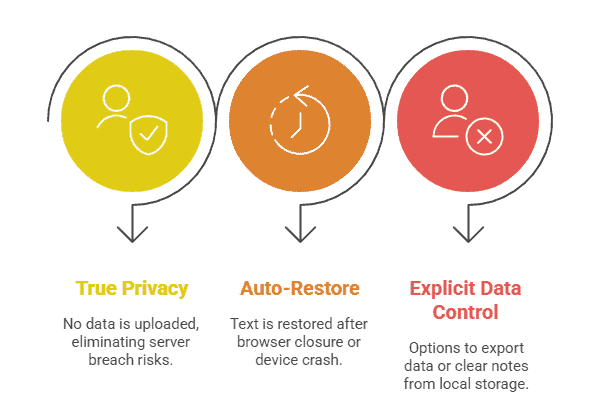
True Privacy: Since no data is ever uploaded, there is no chance of a server breach exposing your work.
Auto-Restore: If you accidentally close your browser or your device crashes, the text is immediately restored the next time you visit the page, thanks to the persistent local save.
Explicit Data Control: You have clear, one-click options to export your data (for backup) or completely clear all notes from your local storage.
Productivity Mode: Checklist, Word Counter & Multi-Tabs
For users moving beyond simple text-entry, we’ve integrated high-demand productivity features that eliminate the need to switch tools:
Task Mode / Checklist Option: Simply click the ‘List’ icon to instantly transform your notes into an actionable checklist, perfect for to-do lists, shopping lists, or tracking workflow steps.
Real-Time Word Counter: Essential for writers, students, and bloggers. A discrete counter at the bottom of the editor provides instant feedback on your word count and character count.
Multi-File Tabs: Manage up to five separate notes simultaneously within the same browser tab. This feature, rare among simple online notepads, lets you quickly switch between drafting a blog post, working on a checklist, and reviewing a code snippet.
Modern UX: Custom Colors, and Font Tools
We analyzed competitor weaknesses in user experience and built a sleek, modern interface:
Enhanced Formatting: Our toolbar moves beyond basic plain text, offering subtle formatting tools like bold, italics, font size adjustments, and even a reliable color picker for highlighting key text (e.g., for study notes).
Cross-Browser Compatibility: Guaranteed responsive performance and consistent design across all major browsers (Chrome, Firefox, Safari, Edge) and operating systems.
Autosave & Export: TXT, PDF, and Markdown Support
Data loss should never be a concern.
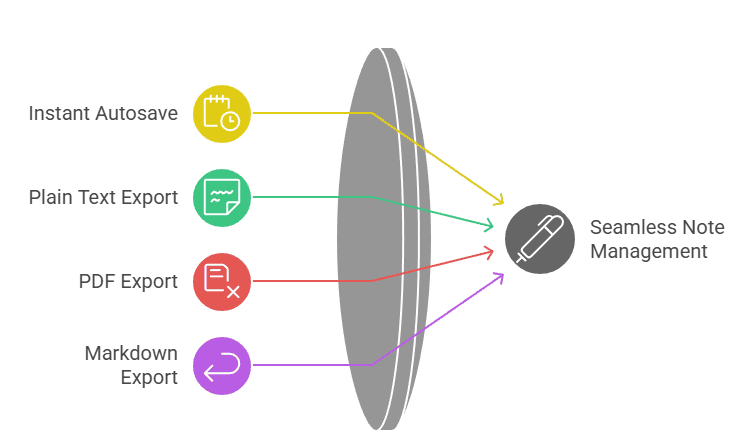
Instant Autosave: Every keystroke is saved locally in milliseconds. You never need to click a “Save” button to protect your in-progress work.
Universal Export: Easily download your notes in standard, portable formats:
Plain Text (.TXT): For maximum compatibility and clean, raw text.
Portable Document Format (.PDF): For sharing and printing with preserved formatting.
Markdown (.MD): For developers, coders, and advanced writers who use Markdown syntax.
Ensure your compliance with the latest Army Body Composition Program (ABCP) standards. Use our army body fat calculator, which employs the official, updated 1-site abdominal circumference formula to quickly determine your percent body fat and confirm if you meet the maximum allowable standard for your age and gender
How to Use Our Online Notepad in 3 Simple Steps
Using the tool is designed to be intuitive and instant. No manual setup is ever required.
Step 1: Open the Notepad (No Registration Needed)
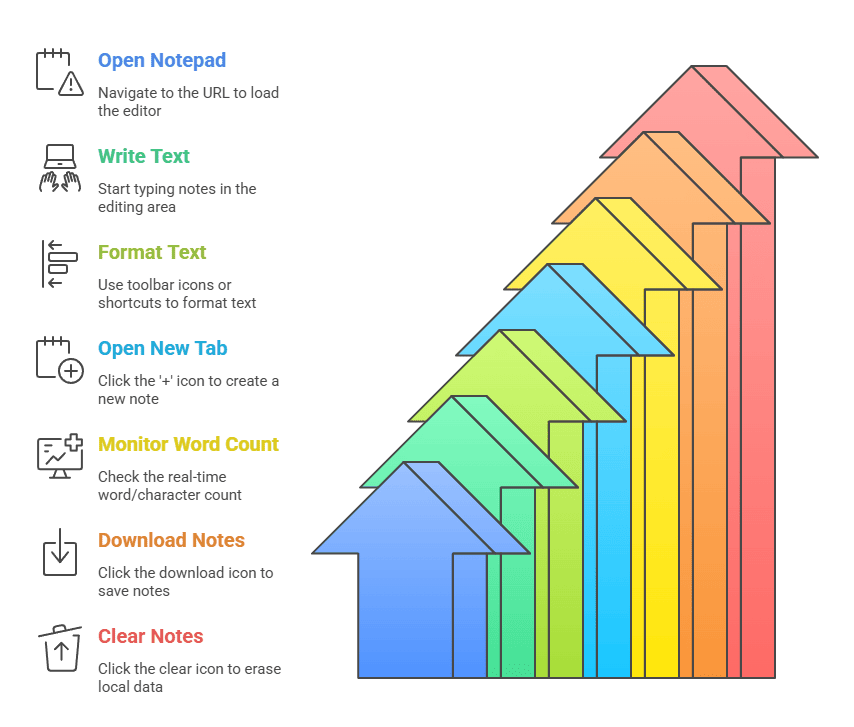
Simply navigate to the URL. The text editor will load instantly, ready for you to type. You do not need to click the “New Note” button.
Tip: Pin the tab in your browser for one-click access to your persistent notes.
Step 2: Write & Manage Your Text (Using Tabs and Formatting Tools)
Start typing your notes. Your text will appear in the main editing area.
Formatting: Use the toolbar icons (or standard keyboard shortcuts like Ctrl+B for bold) to format your text.
Multi-Tasking: Click the
+icon at the top to open a new tab and work on a second, distinct note.Word Tracking: Monitor your progress with the real-time Word/Character Count display.
Step 3: Securely Save, Export or Clear Your Notes
While the notepad automatically saves your progress locally, you have full control over your data:
To Backup: Click the “Download” icon (usually a downward arrow) and select your desired format: TXT, PDF, or DOCX. This saves a copy to your device’s download folder.
To Clear All Data: If you are using a shared computer or simply want to erase your local copy, click the “Clear/Trash” icon. You will be prompted to confirm this action, as it deletes the locally saved file.
To calculate your own LBM using the Boer, Hume, and James formulas—plus the specialized Katch-McArdle for BMR—access our free, all-in-one Lean Body Mass Calculator.Lorem ipsum dolor sit amet, consectetur adipiscing elit. Ut elit tellus, luctus nec ullamcorper mattis, pulvinar dapibus leo.
Comparison: Our Private Notepad vs. Cloud Note-Takers
We offer a focused alternative to feature-heavy, cloud-dependent platforms.
| Feature | Our Online Notepad | Cloud Platforms (Evernote, Notion) | Simple Notepads (onlinenotepad.org) |
| Login / Account Required | NO. 100% optional. | YES (Required for sync and features). | NO (But often lacks advanced features). |
| Data Storage | 100% Client-Side (Local Browser Storage). | Cloud Servers (Data leaves your device). | Local Storage (Less featured). |
| Data Security | Maximum Privacy (No server liability). | Depends on third-party security/encryption. | Strong, but limited in scope. |
| Key Differentiators | Multi-Tabs, Checklist Mode, Markdown Support, PDF Export. | Collaboration, Multimedia (Images/Audio), Calendar/Database. | Autosave, Basic Word Count. |
| Best For | Instant notes, privacy, quick drafts, code snippets, to-do lists. | Long-term project management, team collaboration, complex organization. | One-off, raw plain-text notes. |
Need to solve for time or the decay constant? Access the advanced Half-Life Equation Solver here. (Targets the specific user need (inverse problems) identified in the competitive analysis.)
Advanced Productivity Tips
The tool’s simplicity makes it adaptable for various high-productivity uses:
For Coders and Developers: Use the Markdown/Code Support setting to enable syntax highlighting for clean, readable snippets. Utilize the multiple tabs to keep API documentation or project notes separate from your main code.
For Students and Researchers: Use the color formatting tools to highlight key concepts during initial research. Transform study points into a Checklist Mode to track revision progress.
For Writers and Bloggers: Track your daily output using the Real-Time Word Counter. Draft multiple post ideas in separate tabs. Before publishing, export the final draft as a TXT file to ensure a clean transfer to a CMS without hidden HTML formatting.
For Journaling & Sensitive Notes: Rely on the 100% Client-Side Protection to keep your personal thoughts completely private on your device, avoiding the need for heavily encrypted third-party services.
Stop settling for estimates. Our Money Market Calculator is built with unique features like APY and Nominal APR conversion and an interactive growth chart. Whether you’re saving for a short-term goal or planning for the long haul, this calculator gives you the clarity you need to make the best decision for your cash.
Frequently Asked Questions (FAQ) about the Online Notepad
Yes, the online notepad is 100% free with no hidden costs or premium versions. The core mission is to provide an accessible, high-quality, and private text editor for everyone without monetizing user data or cluttering the interface with ads.
No, you never need to register or sign up. You can begin typing immediately upon opening the page. All key features, including auto-save and export, are available to every user without the need for an account or personal login credentials.
The auto-save feature uses your browser's native Local Storage to save your text every few milliseconds. This process happens entirely on your device, ensuring that if you accidentally close the tab, your text will be restored instantly the next time you open the notepad.
Yes, your text is 100% secure and private. This tool operates entirely client-side, meaning the note content is never uploaded to any server. Your data stays within your web browser on your device, giving you complete, physical control over your information.
No, because the data is saved locally to ensure maximum privacy, your notes will not automatically sync to other devices. To access notes elsewhere, you must manually export the file (as TXT or PDF) and transfer it to the other device.
Yes, you can easily export your notes as a PDF file. By clicking the "Download" button, you are given the option to save your current note in various formats, including TXT (Plain Text), MD (Markdown), and PDF (Portable Document Format).
Yes, a real-time word counter is integrated into the interface. This counter updates dynamically as you type, providing an accurate, live count of both the total words and the total characters in your document, which is ideal for meeting specific length requirements.
To quickly compute your pitcher’s ERA and access advanced features like the 7-inning toggle and inverse mode, check out our free ERA Calculator tool.
Disclaimer: Our Online Notepad is a free browser-based writing tool. All data remains in your local browser storage and is not uploaded to any server. Always export your notes for backup if using shared devices.